Privacy & Crash Reporting
Opt-In Crash Reporting
Sable includes optional crash reporting powered by Sentry. This is disabled by default. If the deployment you're using has crash reporting configured, you'll see a one-time consent banner on first load with two options: No thanks (stays disabled) or Enable (opts in and reloads the app).
Once opted in, unhandled errors and app crashes are sent to Sentry to help the developers find and fix bugs. You can change your choice at any time in Settings → General → Diagnostics & Privacy.
What is and isn't sent
Crash reports are scrubbed before being sent. The following are never included:
- Message content
- Room names
- Your Matrix user ID, room IDs, or event IDs
- Access tokens, device IDs, or any authentication credentials
- Media URLs or file contents
Only technical error information (stack traces, component names, and anonymised breadcrumbs) is transmitted.
Session Replay
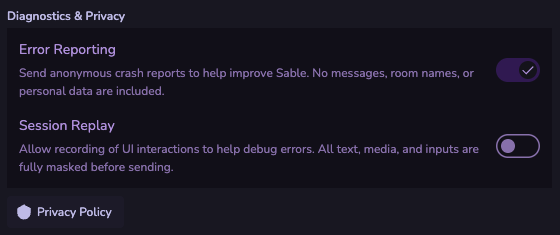
Session replay is a separate opt-in within the crash reporting section. When enabled, an anonymised recording of your UI interactions is captured alongside crash reports to help reproduce bugs. All text, media, and form inputs are masked.
Manual Bug Reports
Type /bugreport in any room's message composer to open the in-app bug report form. Fill in a description of the issue and it will be prefilled into a GitHub issue for you to submit. If crash reporting is enabled, the report can optionally attach your recent debug log.
Privacy Settings
Settings → General → Diagnostics & Privacy contains:
- Crash reporting toggle
- Session replay toggle
- Link to the full privacy policy