Room Abbreviations
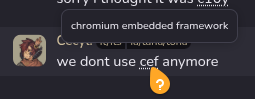
Room moderators can define a glossary of abbreviations and terms for a room. Defined terms are highlighted inline in messages and show a tooltip when hovered (or tapped on mobile).
For Members
When a term is defined in the room, you'll see it underlined with a dotted line in messages. Hover over it to see the definition in a tooltip. On mobile, tap the term to pin the tooltip — tap elsewhere to dismiss it.
For Moderators
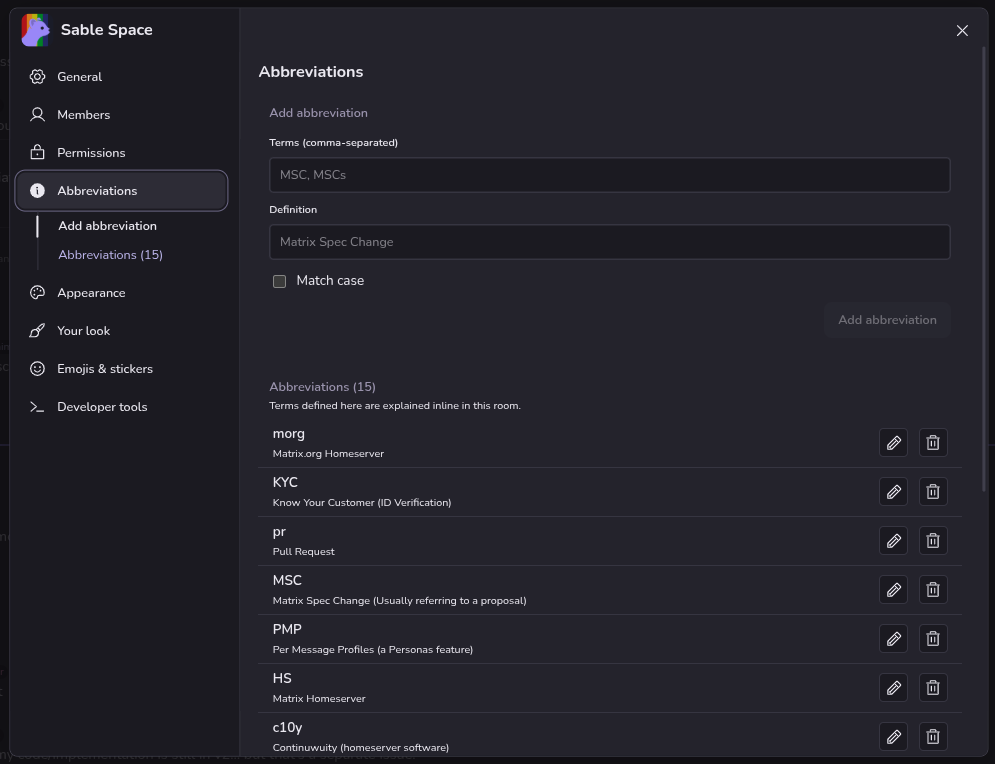
Open Room Settings and navigate to the Abbreviations tab to manage abbreviations.
Each entry has:
- Term — the word or phrase to match (matched at word boundaries, case-sensitive)
- Definition — the explanation shown in the tooltip
Click Add to create a new entry. Click the delete icon next to an entry to remove it.
Space Inheritance
Abbreviations defined in a parent space are automatically inherited by all child rooms and nested spaces. If a child room defines the same term as its parent space, the room-level definition takes precedence.
The abbreviations settings panel shows both locally-defined entries and inherited entries from parent spaces, so you can see the full set of active abbreviations at a glance.
Note: Only users with room moderator permissions (power level 50 or higher) can add or remove abbreviations.